Darius spent three weeks testing vault apps. He downloaded eight of them, moved the same set of test photos into each, tried to access his “private” content as if he were a stranger who had just picked up an unlocked phone, and documented what he found. His conclusion surprised him. Several apps with strong reputations and large download counts had vault icons sitting right on the home screen, labeled with names like “Photo Safe” or “Private Vault.” The apps with the most dramatic security claims were often the easiest to find and identify.
He shared his findings with a small group online, and the response was consistent: people assumed that a high-rated vault app in the Play Store was inherently secure. The rating and the download count felt like proof of quality. What nobody was checking was whether the app’s security architecture actually matched the threat model most people face.
This guide does what Darius did, but systematically. We look at eight vault apps for Android in 2026 — how they work, what they get right, what they get wrong, and who each one is actually suited for. We will be honest about competitors, including their genuine strengths. This is not a rigged comparison. It is the guide we would want to read before making this decision ourselves.
What Should You Actually Evaluate in a Vault App?
Before ranking anything, you need to know what the meaningful criteria are. Most review articles rank vault apps on interface polish and download counts. Those things do not keep your files safe.
Here are the dimensions that actually matter.
Disguise quality: Does the app look like something other than a vault? An app called “Photo Lock Vault” with a padlock icon announces its function to anyone browsing your phone. A calculator disguise that looks and works like a real calculator does not.
Encryption standard: Is encryption actually being applied to files, and what standard is used? AES-256 is the benchmark. Some apps use weaker algorithms or no encryption at all — they just move files to a hidden directory.
Authentication independence: Does the vault use its own credentials, separate from your device PIN? If unlocking your phone effectively unlocks the vault, the vault offers limited additional protection.
Decoy vault: Can the app show a fake vault containing innocent content on demand? This matters for coercive scenarios.
Intruder detection: Does the app log failed access attempts with photographic evidence?
Private browser: Is there a built-in browser that leaves no traces in your main browser history?
Cloud backup: Can encrypted files be backed up to the cloud?
Platform continuity: Does the app work across Android versions and is it actively maintained?
The Apps We Tested
Calculator Hide App
Calculator Hide App is our own product, so I will be transparent about that. I will also be accurate about what it does.
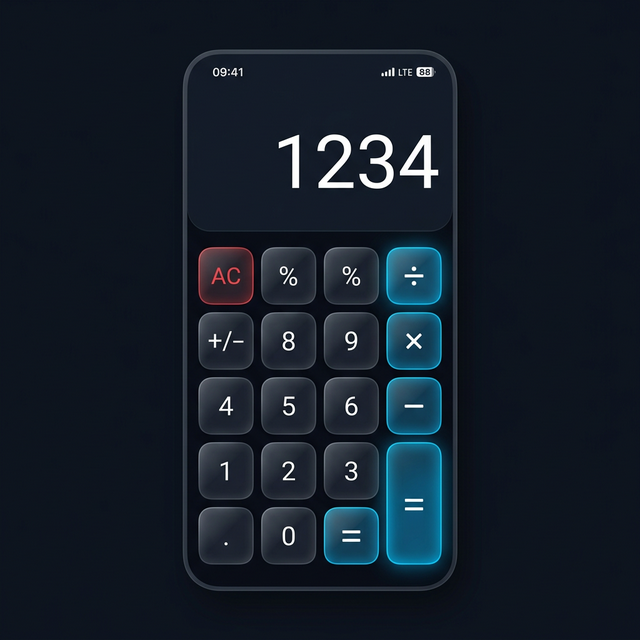
The disguise is the foundation. The app is a genuine calculator that performs real arithmetic. You can use it to calculate tips, split bills, and do everyday math. The vault PIN is entered as a sequence through the calculator interface. Nothing about the home screen icon, app name, or UI appearance reveals that a vault exists inside.
The encryption is AES-256 throughout. Every file stored in the vault is encrypted before it is saved. The encryption key is derived from your personal PIN and is not stored in a recoverable format on the device. This is credential-based encryption, not device-level encryption — the vault stays protected even when your phone is unlocked.
Beyond the core vault, Calculator Hide App includes a decoy vault (a secondary PIN that opens fake content), intruder selfie capture on failed PIN attempts, a private browser that leaves no history in your main browser, app hiding and cloning capabilities, and encrypted cloud backup. You can read a deep dive on how vault apps work to understand why this combination of features matters.
The genuine weakness: as the developer’s own app, there is an obvious bias risk in this comparison. I acknowledge that. I will try to be scrupulously fair about the competition.
Best for: Anyone who needs full-spectrum privacy with genuine disguise, strong encryption, and a complete feature set.
Keepsafe Photo Vault
Keepsafe is one of the most established names in the vault app space. It has been around since 2011, it has a large user base, and its core functionality is solid. Keepsafe offers PIN and biometric authentication, a clean album-based organization interface, and cloud sync. Their cloud infrastructure is designed around encryption, and they take the security aspect seriously.
The honest strengths: Keepsafe’s interface is genuinely polished. The cloud sync works reliably. The app has been actively maintained for years. If you want a vault app that looks and feels like a well-designed photo gallery with a lock on it, Keepsafe delivers that experience better than most.
The honest weaknesses: The Keepsafe icon is widely recognized. Anyone who knows the vault app space — and plenty of people do — sees the Keepsafe icon on your phone and immediately knows you have a private photo vault. There is no disguise architecture. The app does not hide what it is. For anyone whose threat model involves a person who might investigate their phone deliberately, this is a significant gap.
Keepsafe also does not offer a decoy vault or intruder selfie capture. There is no calculator-style entry mechanism. It is a straightforward locked photo gallery, which is secure against casual browsing but not against targeted investigation.
For a full head-to-head analysis, read our Calculator Hide App vs. Keepsafe comparison.
Best for: People who want a well-designed locked photo gallery and are not concerned about an adversary who knows what vault apps look like.
AppLock (by DoMobile)
AppLock is one of the most downloaded Android security apps overall. It puts a PIN or fingerprint lock on individual apps — your gallery, your messages, your social media accounts. It prevents unauthorized access to apps on your unlocked device.
The honest strengths: AppLock is genuinely useful for locking specific apps. If you share a phone with family members or if you want to prevent a casual user from opening your gallery, AppLock provides a quick and effective barrier. The setup is fast and the interface is simple.
The honest weaknesses: AppLock is not a vault app in any meaningful sense. It does not encrypt files. It does not hide content. It locks the door to your gallery, but everything inside the gallery is exactly where it always was. If someone bypasses the AppLock lock (which can happen through system restarts, certain Android versions, or simply uninstalling AppLock), your gallery is fully exposed. AppLock does not move, encrypt, or protect the underlying files at all.
It also announces itself clearly. The AppLock icon is recognizable, and the existence of locks on your apps tells a snoop exactly which apps contain things you want private.
Best for: Light access control in a trusted household or shared device situation — not for genuine privacy from a determined person.
Vault by NQ Mobile (NQ Vault)
NQ Vault has been around for many years under various names. It offers a combined vault and phone cleanup utility. The vault component lets you import photos, videos, and contacts into a protected space with PIN authentication.
The honest strengths: NQ Vault has a broad feature set that includes more than just photo storage. The combination of vault and device optimization tools appeals to users who want a single multi-purpose app. The interface is familiar and functional.
The honest weaknesses: NQ Mobile’s apps have historically had mixed reviews around privacy practices and data handling. There have been past concerns about whether the apps communicate more data than necessary to remote servers. For a tool explicitly designed to hold your most private content, that history is worth knowing about and researching before you commit to it.
The vault icon is also clearly recognizable as a vault app. There is no disguise capability. And the app’s age shows in its interface — it has not kept pace with modern Android design standards as cleanly as more recently developed alternatives.
Best for: Users who are comfortable with NQ Mobile’s privacy track record and want a combined vault and device tool.
KYMS (Keep Your Media Safe)
KYMS is a calculator-disguise vault app that has been available for many years. The concept is sound: it looks like a calculator, you enter a PIN sequence, you access a hidden vault. KYMS deserves credit for pioneering this approach in the vault app space before it became more widely adopted.
The honest strengths: KYMS uses the right disguise architecture. If you enter the app and just use it as a calculator, nothing reveals a vault exists. For users who have used KYMS for years and are comfortable with it, it continues to work for basic vault functionality.
The honest weaknesses: KYMS has not received the same level of active development and feature expansion that newer vault apps have. The interface feels dated by current standards. The encryption transparency is limited — the app does not prominently document which encryption standard is applied to files, which is a concern for users who want to verify what they are relying on. Features like decoy vault, intruder detection, private browser, and cloud backup are either absent or limited compared to current alternatives.
Best for: Users who want a basic calculator-disguise vault and are comfortable with an older, less-featured interface.
Private Photo Vault (Pic Safe)
Private Photo Vault, also marketed as Pic Safe, has a strong following on both Android and iOS. It offers PIN authentication, photo import and organization, and some cloud sync capability. The interface is photo-gallery-focused and fairly polished.
The honest strengths: Private Photo Vault is straightforward and does its core job reasonably well. The import process is easy and the organizational structure is logical. For users who primarily need photo and video storage, it covers the basics.
The honest weaknesses: Like Keepsafe, Private Photo Vault does not disguise what it is. The icon and name make it immediately recognizable as a private vault. There is no calculator disguise or other misdirection architecture. For users whose concern is specifically that someone who knows vault apps might look through their phone, this is a meaningful limitation.
Best for: Users who want a clean, photo-focused vault interface and are not concerned about disguise.
Secret Calculator (various apps)
There are several apps in this category on the Play Store, all using some variation of “Secret Calculator” as their name. These apps use the calculator disguise concept, and some have reasonable functionality.
The honest challenge: the “Secret Calculator” name in the Play Store creates its own exposure problem. If someone searches your installed apps for “secret” or “calculator,” they will find apps with these names. The word “secret” in the app name somewhat undermines the disguise. The quality varies significantly between apps in this category, and the encryption implementations are not always clearly documented.
Best for: Users who want a budget-oriented calculator-disguise vault and are comfortable with variable quality.
Calculator+ (by Fd Inc)
Calculator+ is another calculator-disguise vault with a reasonably active user base. It uses PIN entry through a calculator interface to access a hidden vault. The app covers basic import and storage functionality.
The honest strengths: The calculator disguise is clean. The app works as a functional calculator. The vault access mechanism is the same conceptual approach as Calculator Hide App.
The honest weaknesses: Calculator+ does not offer the full feature set that Calculator Hide App provides. Decoy vault capability, intruder selfie detection, private browser integration, and advanced cloud backup are not present in the same configuration. The encryption standard used is not as prominently documented.
Best for: Users who want a calculator-disguise vault with basic functionality and a simple interface.
Comparison Table
| App | Disguise | Encryption | Decoy Vault | Intruder Detection | Private Browser | Cloud Backup | Actively Maintained |
|---|---|---|---|---|---|---|---|
| Calculator Hide App | Yes (calculator) | AES-256 | Yes | Yes | Yes | Yes | Yes |
| Keepsafe | No | Strong | No | No | No | Yes | Yes |
| AppLock | No | None | No | No | No | No | Yes |
| NQ Vault | No | Yes | No | No | No | Partial | Partial |
| KYMS | Yes (calculator) | Undocumented | No | No | No | Limited | Limited |
| Private Photo Vault | No | Yes | No | No | No | Partial | Yes |
| Secret Calculator (various) | Partial | Variable | No | No | No | No | Variable |
| Calculator+ | Yes (calculator) | Yes | No | No | No | No | Partial |
Why Disguise-Based Vaults Beat Icon-Lock Vaults
This deserves its own section because it is the central insight that most vault app comparisons miss.
An icon-lock vault — apps like Keepsafe, Private Photo Vault, and AppLock — protects your content behind a lock. The lock is real. But the existence of the vault is announced by the icon on your home screen. Anyone who knows what these apps look like (and plenty of people do, because these are popular apps) sees the icon and immediately knows there is a private vault on your phone.
This creates a specific vulnerability. The attacker does not need to break the lock. They just need to apply social pressure. “Open your vault for me.” “Let me see what’s in there.” “Why do you have a secret app?” The lock protects against technical access. It does not protect against social coercion.
A disguise-based vault removes the target. If your vault looks like a calculator, there is no vault-shaped target for social pressure to aim at. “Open your calculator” is not the same kind of demand as “open your vault.” The attacker does not know a vault exists.
The decoy vault takes this further. Even if someone does suspect a vault and presses you to open it, you show them the decoy. They see innocent content and the conversation ends.
This is the architectural difference that matters. It is why the app hider vs vault app comparison matters — hiding an icon is not the same as hiding content within an encrypted, disguised container.
What About Your Existing Gallery App?
One thing most people do not consider: your phone’s default gallery app may already be leaking more than you realize. Read our analysis on whether your gallery app is actually private — the answer might change how you think about your baseline privacy setup.
The Danger of Generic Vault Apps
There is a category of risk worth mentioning directly. Some vault apps in the Play Store have been found to be malicious — they collect the photos you “protect” and upload them. Others have weak or nonexistent encryption, storing files in hidden directories that any file manager can access. When you put your most private content into a vault app, you are trusting that app deeply.
Read our post on the dangers of generic vault apps for a full breakdown of the risks. The short version: use an app with documented encryption standards, a clear privacy policy, and an established reputation. Do not just download the first result that appears for “photo vault” in the Play Store.
Frequently Asked Questions
Do all vault apps actually encrypt files?
No. This is one of the most important things to understand. Some vault apps — including some with high ratings — simply move files to a hidden directory or rename file extensions to prevent gallery apps from displaying them. This is not encryption. A file manager or any app with storage access can find and open these files. Only apps that use genuine cryptographic encryption (AES-256 is the standard to look for) actually protect file content from unauthorized access.
Is Keepsafe trustworthy?
Keepsafe has operated for many years with a generally positive security reputation. Their encryption implementation is solid and their cloud infrastructure takes security seriously. The honest concern with Keepsafe is not whether it is trustworthy — it likely is — but whether its visible, recognizable icon adequately serves the privacy use case for people who need their vault to be undetectable. For straightforward locked photo storage, Keepsafe is a legitimate option. For situations requiring genuine stealth, its lack of disguise is a structural gap.
Can I use more than one vault app at the same time?
Yes. Some users keep a decoy vault app (a recognizable one like Keepsafe, holding innocent photos) and a disguised vault app (like Calculator Hide App, holding genuinely private content). If someone discovers the Keepsafe app, they see innocent content and believe that is the only vault. The real private files are in the calculator app that nobody suspects. This layered approach is actually quite effective.
What happens to my vault photos if I factory reset my Android device?
Vault photos stored only locally on your device will be permanently deleted in a factory reset. This is why encrypted cloud backup matters. Calculator Hide App supports cloud backup in encrypted form — your vault can be restored after a factory reset or device switch by signing in and entering your PIN. Apps that do not offer cloud backup create a real risk of permanent loss.
Is AppLock better than nothing?
AppLock provides a meaningful barrier against casual, opportunistic browsing. If someone picks up your unlocked phone and opens your gallery, AppLock stops them. What it does not do is protect against someone who bypasses the lock (possible in various scenarios), removes the AppLock app, reboots the device into safe mode (which may disable third-party apps like AppLock), or accesses your files through a file manager instead of the gallery app. For the casual browsing scenario, it helps. For any serious privacy need, it is insufficient on its own.
How do I migrate from one vault app to another?
The process involves exporting files from your current vault app back to your device storage, then importing them into the new app. Most vault apps have an export or “restore to device” function. The important step is confirming that files are successfully imported and accessible in the new app before deleting the old vault. Do this migration on a secure, private network and ensure you clear the intermediate files from your device storage after the transfer is complete.
Are free vault apps safe to use?
Freemium vault apps are generally safe from established developers. The concern is with completely free, obscure apps from unknown developers — these are more likely to have questionable encryption implementations or data collection practices. Established apps like Keepsafe and Calculator Hide App have free tiers that are safe. An app with no development history, no privacy policy, and an unusually simple description in the Play Store warrants skepticism. If you are weighing the cost-benefit, our guide on free vs. paid vault apps covers which features are worth paying for.
What should I look for in a vault app’s privacy policy?
Look specifically for: what data the app collects and sends to its servers, whether encrypted content is stored on the developer’s servers (and in what form), what happens to your data if you cancel or delete the account, and whether the app shares data with third parties. A vault app that stores your unencrypted photos on its own servers is not really a vault — it is a cloud storage service with a privacy-theater veneer.
Can a vault app hide apps as well as photos?
Some vault apps include app hiding or app cloning features alongside photo storage. Calculator Hide App includes app hiding and cloning capabilities. The how to hide apps on Android guide covers this in detail. App hiding within a vault context is different from simple launcher-level hiding — properly implemented, it makes apps invisible from the app drawer, not just from the home screen.
Does Android 14 or 15 change anything about vault app security?
Recent Android versions have tightened storage permissions, making it harder for apps to access files they do not own. This is generally positive for privacy. Some older vault apps that relied on broad storage access may behave differently on newer Android versions. Calculator Hide App is designed to work within the modern Android permission model. The tighter permissions of recent Android versions actually reinforce the value of dedicated vault apps, since it becomes harder for any random app to access your vault’s storage directory. For a full breakdown of how Calculator Hide App specifically handles the Android 14 and 15 permission changes, see our dedicated post on Calculator Hide App on Android 14 and 15.
The vault app space has a lot of noise. Download counts and star ratings tell you what is popular, not what is actually secure. The apps that stand out on the dimensions that matter — encryption standard, disguise quality, decoy capability, and active development — are a much shorter list.
Download Calculator Hide App and experience what a full-featured, genuinely disguised vault app looks like. Your first vault is free to set up, and the difference from icon-based alternatives is immediately obvious.